Feeling lost in the vast and wonderful world of Neopia? Whether you’re a newbie just hatching your first Neopet or a seasoned veteran returning after a long hiatus, this Neopets guide is your key to unlocking all the secrets and treasures this virtual world has to offer.
With this guide, we aim to be your comprehensive companion on your Neopian journey. Consider it your personal roadmap, your cheat sheet, your encyclopedia of all things Neopets. We’ll equip you with the knowledge and Neopets tips you need to thrive in Neopia, whether your goal is to amass a fortune in Neopoints, dominate the Battledome, or simply create the most stylish Neopet in existence.
What this Neopets Guide Offers:
Neopets Basics: Starting your adventure? This section of the guide will walk you through the fundamentals, from creating your account and choosing your first Neopet to understanding Neopia’s currency and navigating its diverse lands.
Neopoint Mastery: Neopoints make the Neopian world go round. This Neopets guide will reveal the most effective ways to earn Neopoints, including playing games, restocking shops, investing wisely, and even participating in the thrilling Food Club.
Battledome Supremacy: Ready to unleash your Neopet’s inner warrior? This section of the guide will delve into Battledome strategies, training techniques, and equipment acquisition, ensuring your Neopet emerges victorious from every battle.
Customization and Style: Express your creativity by customizing your Neopet with a dazzling array of clothing, accessories, and paintbrushes. This Neopets guide will offer tips on finding rare items and creating a truly unique Neopet style.
Game On! Neopets boasts a vast collection of games, from classic Flash games to new HTML5 creations. This guide will provide Neopets game guides, tips, and tricks to help you conquer challenges and earn those coveted trophies and avatars.
Community Connections: Neopia is more than just a virtual world; it’s a thriving community. This Neopets guide will help you connect with fellow Neopians through guilds, Neoboards, and other social features, fostering friendships and trading opportunities.
Ready to dive deeper into Neopia? This Neopets guide is your passport to adventure!
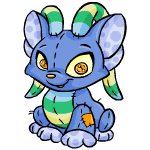
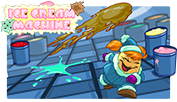
Welcome to the whimsical world of Neopia’s Ice Cream Machine, where mouse control, strategic gameplay, and a sprinkle of luck combine to create a delightful gaming experience. Join Adee the Chia, who, after indulging in excessive amounts of ice cream, finds herself navigating through dreamlike scenarios in a giant Ice Cream Machine. This guide will unravel the intricacies of the game, offering tips, strategies, and a level-by-level walkthrough to help you conquer this frozen adventure.
Game Instructions:
Embark on a sweet journey as you guide Adee through 13 rounds, each featuring different flavors and colors of ice cream. The goal is simple: dodge the ice cream scoops launched at Adee. The scoops range from Vanilla Chocolate Chip to Strawberry, Chocolate, and Vanilla combinations. Discover special scoops that bring extra points, alter Adee’s size, speed, or provide unique bonuses.
SPECIAL Scoops:
Cherry Bonus: Adds 100 points and restores Adee to her original size.
Fish Bonus: Adds 250 points and restores Adee to her original size.
Strawberry Bomb: Clears the game board but doesn’t contribute to points.
Speed Scoop: Increases scoop speed. Use strategically.
Slow Scoop: Slows down scoop speed. Use sparingly.
Down-sizing Scoop: Reduces Adee’s size. Useful in later levels.
Up-sizing Scoop: Increases Adee’s size. A challenge option.
Extra Life Scoop: Grants an additional life. Collect whenever possible.
Shield Scoop: Provides a temporary shield. Not affected by size or speed scoops.
Gameplay Tips:
Keep Your Eyes Open:
Blinking at the wrong time can lead to mishaps. Use shields wisely for quick breaks.
Concentration is Key:
Avoid frequent checks of lives and remaining scoops to maintain concentration.
Stay Centered:
Position Adee in the center of the game board for better maneuverability.
Watch Adee, Not Just the Scoops:
Focus on Adee’s movements for improved gameplay.
Avoid Right-Clicking:
Right-clicking results in an automatic game over. Be cautious to prevent accidental clicks.
Manage Distractions:
Minimize distractions, close IM windows, and create a focused gaming environment.
Build Up Lives:
Restart if lives are lost early for higher scores and avatar attempts.
Take Breaks:
Periodic breaks help maintain focus and prevent fatigue.
Confidence Matters:
Approach each level with confidence for a positive impact on performance.
Experiment and Practice:
Try new moves and techniques for continuous improvement.
Advanced Strategies:
Game Code:
Input “strawberryvanillachocolate” during a level for an extra life.
Orange T-Shirt Guy:
Wait on the level-up screen for Orange T-Shirt Guy to appear for potential luck and extra NP.
Level-by-Level Guide:
Level One:
Flavor: Strawberry
Color: Pink
Scoops: 25
Difficulty: Easy
Level Two:
Flavor: Vanilla
Color: Creamy yellow
Scoops: 50
Difficulty: Simple
Level Three:
Flavor: Chocolate
Color: Brown
Scoops: 75
Difficulty: Getting harder
Level Four:
Flavor: Mint
Color: Mint green
Scoops: 100
Difficulty: Not that hard
Level Five:
Flavor: Blueberry
Color: Blue
Scoops: 125
Difficulty: Reasonably intermediate
Level Six:
Flavor: Vanilla Chocolate Chip
Color: Creamy yellow with brown spots
Scoops: 150
Difficulty: Toughie
Level Seven:
Flavor: Strawberry, Vanilla, and Chocolate
Color: Neapolitan (Pink, Creamy Yellow, Brown)
Scoops: 175
Difficulty: Tricky
Level Eight:
Flavor: Peach

Color: Orange
Scoops: 200
Difficulty: Very tough
Level Nine:
Flavor: Vanilla Chocolate Swirl
Color: Brown with creamy yellow swirls
Scoops: 225
Difficulty: VERY HARD
Level Ten:
Flavor: Double Chocolate
Color: Brown with dark brown spots
Scoops: 250
Difficulty: To quote Velma, “YIKES!”
Level Eleven:
Flavor: Tigersquash
Color: Purple with Neopets Orange zigzagging
Scoops: 275
Difficulty: Very, very hard
Level Twelve:
Flavor: Rainbowberry
Color: RAINBOW
Scoops: 300
Difficulty: Intense
Level Thirteen:
Flavor: Garlicy Bratwurst
Color: Blood red
Scoops: 325
Difficulty: Intense, but not as difficult as Rainbowberry
Conclusion:
In the whimsical world of Ice Cream Machine, perseverance, patience, and practice are the keys to success. Whether you’re aiming for high scores or attempting to attain the coveted avatar, this comprehensive guide is your companion. Good luck, and may your Neopian adventures be filled with sweet triumphs!
Greetings, Turmac Roll enthusiasts! Whether you’re a novice seeking to improve your high score or a seasoned player aiming for the world challenge, this guide is designed to elevate your Turmac Roll skills. With a bit of practice, you can easily achieve 3k points per day and potentially claim a shiny trophy. Let’s dive into the intricate world of Turmac Roll and unravel the strategies that will lead you to victory.
Basics:
Turmac Roll revolves around guiding the rolling Turmac through various obstacles. Master the controls:
Right Arrow Key: Speed up
Left Arrow Key: Slow down
Up Arrow Key: Jump
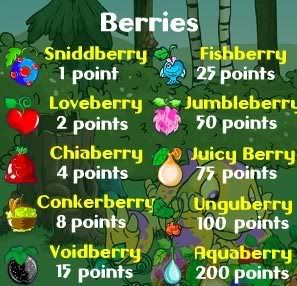
Your survival depends on accurate jumps, avoiding obstacles like trees and spikes. Berries enhance your score, and different game difficulties affect point multipliers. Playing in hard mode yields the maximum points, making it the recommended choice.
Tips and Screenshots:
1. Always Play in Hard Mode:
Opt for hard mode to maximize your points, especially considering the 600 points for an aquaberry.
Difficult obstacle combinations also appear in easier modes, though less frequently.
2. Maintain Full Speed:
Keep Turmac at full speed to ensure successful jumps over obstacles.
Slowing down can lead to insufficient height, causing collisions.
3. Practice and Memorization:
Turmac Roll has 14 obstacle combinations that appear randomly but always in the same sequence.
Memorize these combinations to anticipate and navigate obstacles effortlessly.
4. Minimize Background Programs:
Close unnecessary programs to ensure smooth gameplay.
Minimize browser windows or downgrade game quality to avoid interruptions.
5. Obstacle Combinations:
Provide strategic tips for each of the 14 obstacle combinations.
Detailed guidance on when to jump, slow down, or speed up for optimal performance.
Obstacle Combinations:
1. Obstacle Combination 1:
Jump off where indicated to clear the spike.
2. Obstacle Combination 2:
Jump late off the hill to gain speed and clear the tree.
3. Obstacle Combination 3:
Jump off the first stump, aiming to land before the second one. Alternatively, use a player-suggested technique.
4. Obstacle Combination 4:
Jump off the ramp to land safely after the spike.
5. Obstacle Combination 5:
Jump off the hill to land past the tree. Immediate jump after landing to avoid the spike.
6. Obstacle Combination 6:
The most challenging combination.
Detailed instructions on navigating the three trees and surviving this tricky sequence.
7. Obstacle Combination 7:
Jump off the tree to collect the berry.
8. Obstacle Combination 8:
Jump off the first hill, land on the ramp, and jump off again to collect the berry.
9. Obstacle Combination 9:
Straightforward. Jump off the hill and continue rolling.
Jump off the hill to clear the first berry. Additional instructions for avoiding the last spike.
13. Obstacle Combination 13:
Sequence involving jumps and berry collection. Tips for smooth execution.
14. Obstacle Combination 14:
A relatively simple sequence. Jump off the hill and enjoy the ride.
Conclusion:
With this comprehensive guide, you’re equipped to tackle Turmac Roll with confidence. Practice, memorize obstacle combinations, and implement the provided tips to enhance your gameplay. Whether you’re aiming for a world challenge or trophy position, Turmac Roll offers endless possibilities for improvement. If you have questions or suggestions, feel free to reach out. May your Turmac Roll adventures be filled with high scores and triumphs!
Welcome to Meridell, where precision and skill come together in the challenging game of Ultimate Bullseye II. If you’re looking to conquer this tricky game, you’re in the right place. This comprehensive guide will walk you through everything you need to know, from the basic controls to advanced strategies, power-ups, and even quirky elements like Meridellian balloons and Punch Bag Bob. Let’s dive into the world of arrows, targets, and points!
Basic Controls:
Before we embark on this journey, let’s familiarize ourselves with the controls:
UP KEY: Moves the bolt up.
DOWN KEY: Moves the bolt down.
SPACEBAR: Used to power up the shot.
Catapult Code: Type in “catapult” to gain a random power-up during the game.
Avatar:
To attain the coveted avatar, score 100 points in a single game. The avatar showcases your mastery in the art of hitting bullseyes.
Getting Started:
For Beginners:
Click on the “Click to Play” button on the game page.
Wait for the game to load and click on instructions. Read them thoroughly.
Click “Go back” and then click “Start Game” when you are ready.
Don’t press any keys initially. Press the space bar to fill in the power meter to about half.
Release and repeat. This should help beginners secure at least 10-20 points.
For Experienced Players:
Now you can move the catapult.
Fill in the power meter based on the position of the bullseye painted wood.
Release the space bar for a chance to get +2, +3, +5, or +10 points.
Points are affected by the accuracy of your aim.
Power-Ups:
Power-ups can give you a significant advantage in the game. There are five different power-ups to utilize strategically:
Growing Target: The bullseye board grows and shrinks in a continuous cycle.
Fire Loop: A fire loop appears, granting x2 points when the bolt goes through it.
Moving Target: The bullseye board moves in various directions.
Triple Shot: Shoot three bolts at once with your catapult.
Inverted Target: The board turns blue, switching point values and positions.
Note: Inverted Target only occurs when you have the Inverted Target power-up.
Da Balloons:
These Meridellian balloons add an extra layer of challenge and points to the game:
Popping a balloon without hitting the board gives 5-10 points.
Popping a balloon and hitting the board grants 30 points plus the usual points.
King Hagan Balloon:
Appears randomly after a bullseye.
Gives 10-15 points when popped without hitting the board.
Grants 35 points plus the usual points when popped and hitting the board.
Punch Bag Bob:
Meet Punch Bag Bob, offering additional points for precision:
Every part of his body is worth 5 points.
Hitting the apple on his head awards 20 points.
Awesome Combos:
Combos can be a game-changer, providing extra points for skilled shots. An example of a combo is hitting a fire loop, a King Hagan balloon, and a ten, giving an extra 95 points.
Conclusion:
Now that you have the ultimate guide to Ultimate Bullseye II, go out there and try your best! Remember, precision and practice will lead you to victory in this challenging game. Good luck, and may your arrows always hit the bullseye!
Step into the enchanting realm of Neopia as we embark on a whimsical journey through the magical world of Faerie Bubbles. Nestled within the vast landscape of Neopets, Faerie Bubbles emerges as a captivating and spellbinding game that beckons players with its charm and challenge. Join us as we explore the ethereal allure of Faerieland, where bubbly wonders await those daring enough to venture into this fantastical experience. With faeries, bubbles, and a dash of magic, this article aims to unravel the intricacies of Faerie Bubbles, from its inception to the strategies that will guide you through its mesmerizing gameplay. So, ready your wand and get ready to pop some bubbles, for an enchanting odyssey into the Faerie Bubbles awaits!
The Enchanting Gameplay:
Faerie Bubbles introduces players to a magical world where strategic bubble-popping skills are the keys to success. The game consists of 20 levels, each presenting a unique challenge with different bubble arrangements. To aid players on their quest, there are cheat codes that can be used strategically. These cheats include ‘Bubbles’ (turns all bubbles into one single color), ‘Slumberberry’ (makes your bubbles go back to the top of the screen after being pushed down), ‘Faerieland’ (gives you a rainbow bubble), and ‘Stardust’ (bestows upon you a nova bubble).
Mastering the Art of Bubble Popping:
Faerie Bubbles is not just about popping bubbles randomly; it requires a keen understanding of bubble combinations and strategic thinking. One essential aspect is the utilization of bubble combos. Shooting a bubble to a group of three or more bubbles of the same color, forming a group of four, triggers a combo with various effects depending on the bubble type. For example, the Water Combo causes all water bubbles on the level to disappear, while the Light Combo converts all the bubbles it is touching to one random color.
Navigating Through Levels:
Each level presents a unique challenge, and successful navigation requires both skill and strategy. Here’s a breakdown of some key strategies for specific levels:
Level 1: Optimal for play if the top bubbles are fire, water, or light. Restart if the level is filled with undesirable dark, earth, or air bubbles.
Level 2: Activate the light combo, touching the earth bubbles to change their color.
Level 3: Clear light combos first, then deal with the middle bubbles.
Level 4: Activate the fire combo to burn away earth bubbles, then clear water bubbles.
Level 5: Focus on getting rid of each set of bubbles, prioritizing earth bubbles before fire ones.
Level 6: Requires precise aiming. Get rid of each pair of colors, placing unwanted bubbles under others.
Level 7: Similar to Level 6, focus on precise aiming and eliminating pairs of bubbles.
Level 8: Tricky level with water, light, and dark bubbles. Use water combo, then light combo on the left, and finally the other dark combo.
Level 9: Relatively easy level if you aim accurately. Eliminate pairs efficiently.
Level 10: Activate fire combos strategically to avoid unwanted combos, then clear the level.
Level 11: Sequence: air, light, fire, water. Prioritize air and light bubbles for efficient clearing.
Levels 12 and 13: Similar levels with different bubbles. Sequentially get rid of each row for smooth progression.
Level 14: Use ‘Stardust’ at the beginning, aiming at the right side of the screen for easier clearing.
Level 15: Use ‘Bubbles’ at the beginning. Type ‘Faerieland’ afterward for potential nova/rainbow bubbles.
Level 16: Avoid using ‘Slumberberry.’ Clear middle and top bubbles systematically.
Level 17: Preserve ‘Slumberberry’ for Level 19. Clear earth and light bubbles for access to the remaining bubbles.
Level 18: Tricky level requiring precise aiming. Aim for the top bubbles to clear the level in one shot.
Level 19: Use ‘Slumberberry’ strategically. Aim carefully and shoot to clear the level with ample space.
Conclusion:
Mastering Faerie Bubbles is a delightful challenge that rewards players with not just points but also the satisfaction of conquering a magical realm filled with bubbly wonders. Whether you’re aiming for the avatar or simply enjoying the enchanting gameplay, these strategies will serve as your guide through the mesmerizing world of Faerie Bubbles. So, don your wizard hat, wield your wand, and let the magical adventure begin! May your bubbles pop true, and your scores soar high in the enchanting skies of Neopia!
The Neopian Times is a newspaper that is released late each Friday (except during holidays) which contains articles, short stories, series, comics, and editorials. It is one of the best places you can go to find different guides and information, as well as just neo entertainment. You can find the NT by clicking on News or you can click here.
Users just like you submit items to be published in the Neopian Times. It is a great way for people to read your stories, articles, series, or comics. Being published also means a trophy on your lookup, gain you certain avatars if your are published 10 times or in certain issues. You can even gain prizes for having your items published in special editions.
After you’ve written your article, short story, series, or drawn your comic, just go to the front page of the NT. On the right hand side, near the bottom, you will see a link to the submission form or you can click here. Each item (i.e. short story, article, etc) has certain requirements, and these requirements are listed on the submission form. I will also discuss these requirements in the following sections on this petpage.
You can submit short stories, series, articles, and comics. Please note that I don’t mention editorials since they don’t count towards the numbers of items you have published, avatars, or any prizes that may be given.
Short stories are simply one part neopian based stories. They can be about neopets, faeries, or other neopian characters. The submission requirement for a short story is that it has to be between 1,200 and 4,000 words long. It also has to be neopets based, your own original work, and cannot contain content that violates the rules. Just think of it this way: if you can’t post it on the boards, don’t put it in your story.
A common question I have seen is what makes a good short story for the Neopian Times. Other than originality, I feel the best short stories are the ones that truly feel like that are completely neo based. What I mean is a story that isn’t a generic story that just has neopets characters. For example, let’s say you had a short story about a dog lost in the woods. You could make it a Gelert in the Haunted Woods, but that’s not necessarily a good neo story. Try writing stories that are uniquely neopets based.
A series is similar to that of a short story except that it contains multiple parts. Each part can be between 1,500 and 50,000 words long. Series can be anywhere from 2 to 12 parts long, however the preferred length is between 4-8 parts. As for what the series may contain, that is exactly the same as short stories. Again, make sure you are familiar with the neorules and make sure your series doesn’t violate any. I really enjoy series because each part counts as a different winning entry, so this can help you reach the number needed for the avatar. However, please don’t try to ‘stretch’ your story so that it has more parts than necessary. If you can write your story in four parts, don’t try to make it six.
An article is a factual, informative piece. The most common articles are guides, but that’s not the only type of articles that can be written. An article can be information about a new plot, or just a discussion of some recent neopian development. Quizzes and rants are also accepted. An article must be between 1000 and 50,000 words. In some cases, I’ve seen articles broken up into two parts. For example, if I was to make this into an article, I might have “Guide to Becoming a NT Star” as the first part, and “Guide to Becoming a NT Star Revisted” as the second. This doesn’t happen often however. Just as with all other items, articles must be neo-related and should follow the rules .
There is one exception to the ‘factual’ rule. Interviews with neopet characters are also accepted as articles even though it is quite a bit of creative writing on the part of the author. If I was to write out an interview with Dr. Sloth, for example, it could be submitted as an article rather than a short story.
Comics should be in JPG or GIF format and no bigger than 200 KB. The width should not be wider than 470 pixels. If you are creating the image on most paint programs, you can find out the width and file size by clicking on properties. The point of a comic is a drawing or series of drawings that is humorous or is part of an entertaining story. You don’t have to be a great artist and you can get someone else to do the artwork as long as they are given credit. Like everything else in the NT, the concept of the comic needs to be your own original idea.
In some ways, comics are the most difficult to have selected for the NT and often have the longest wait time until being published. More comics are submitted in comparison to stories and articles. I had to submit quite a few before I finally had one accepted.
Collaborations are when two people work on a submission together. All of the same rules apply depending on whatever it is they are submitting. However, only one person submits the pieces. Just below the submission box, there is a place to write any notes, and that’s where it should be noted that this was a collaboration. Both people will get the trophy if it is published. If this is for a special edition of the NT, both individuals would also receive the prize. However, collaborations should be done cautiously and only with other players whom you trust not to steal your work.
So, you finished writing and you’ve submitted your piece. Now what? Well, now you wait to hear back from TNT. The time it takes to hear back can vary greatly from submission to submission. The fastest I ever heard back was within one day, but that is unusual. The typical wait time is between 2 to 4 weeks for your first neomail.
Did you get a neomail stating that your work was accepted? Great! That means that you will be published in the next issue of the Neopian Times. Sit back and breathe a sigh of relief.
However, I’ve only had one piece that was immediately accepted. Most often, you will receive a neomail saying your piece is being held for further consideration. This is very good. Of all the pieces I’ve had held over, only one was later rejected. All of the others were accepted.
That leaves rejected. However the neomail that rejects the piece will also say why it was rejected so that you can continue to work on it. Some reasons for rejections are:
*Too many grammatical/spelling errors *Uses technology that doesn’t exist in Neopia (i.e. cars) *Didn’t name the color and species of all the neopets in the story *Had a neopet that was a color it can’t be painted yet *Violates rules *Editor didn’t get the joke (comics) *Overused subject *Too violent
Whenever you get a rejection letter, try correcting whatever problem there was and resubmitting – with the exception of the overused subject. In that case, you’re probably just going to have to find something else to write about.
Too Many Good Entries
There is one other rejection I didn’t list: too many good entries. This means there is nothing wrong with your article/story/comic, it just wasn’t accepted. In that case, feel free to enter again without making any changes. However, it’s still a good idea to read over your story just in case you think of a way to improve it. Oddly enough, I once got a neomail concerning my guide on this subject. The person wrote, “No offence, but TMGE just means you story was terrible and you should give it up.” This isn’t true. My series was rejected for this reason the first time, and it was later accepted with only some minor tweaking. I’m not saying that you shouldn’t do anything to improve before resubmiting, because you should, but TMGE doesn’t mean to scrap the piece altogether.
Overused subject is one the most common reason for being rejected. Basically, anything that’s been written about several times, or has been in a recent edition is considered overused. Here are a few examples:
*Game guides for older games that already have more than 2 guides or a new game that already has a guide. *Newbie Guides *Avatars (how to get avatars, what your avatar says about you, etc) *Stories/Series that are parodies of famous stories. These are not only overused, but frowned upon in general. *Paint Brush Guides
Final Thoughts
FAQ
How long does it take to hear back after you submit something to the NT? It usually takes 2-4 weeks to get your first neomail which is most often held over or rejected. If you story is held over, you may have to wait several weeks for it to be published. You will get an acceptance neomail the Friday before the NT that has your submission is published. If you don’t hear anything back in 5 weeks, then it is okay to resubmit as entries are occasionally overlooked.
Can my neopets in my stories/series have parents or just owners? In NT stories neopets can have parents, grandparents, sisters, brothers, etc. You don’t want to dwell on other types of relationships though. Pets rarely have owners in stories, although it’s more common in comics.
Can I have fighting or death in my story? Fighting is fine as there is a battledome, but you don’t want to get to graphic or gory. The same is true with the more morbid subject of death. While it can be written, it’s a subject that must be handled delicately. Often, it’s better to imply these issues that discuss them openly or in detail.
If I want a story/series/article in a specific issue, when is the best time to submit? If you have a story that just has to be in a specific issue, then it’s best to submit at least 3 weeks in advance. Occasionally, really entries will be accepted later, but you definitely want your entry to have time to be read and accepted before all the pieces for the special issue have been chosen. Because of the prizes, more people will usually try for the speical edition.
Do I need to format my entry before submitting? You don’t need to add html before you submit, but you do need to break it up into paragaphs.
Do editorials count towards the avatar or trophy? No. I enjoy the editorials and find it’s an excellent way to get a more detailed explanation of rules and such, but having your question answered will not earn you a trophy nor will it increase your published count.
*One thing that’s so easy to do when writing a story is to forget to name the color and species of all the neopets in the story, but you have to do this or your story will be rejected. Read your story carefully to make sure you didn’t forget this detail.
*Spellcheck and proofread everything before you submit. A few mistakes may slip by (usually happens to me) but the fewer mistakes, the better your chances of being accepted.
*You should never include anyone’s username or pets other than your own except with permission.
*Be careful when discussing ideas for comics/stories/articles on the boards. Some ideas have been stolen in the past.
*If you entry was rejected, use the reason it was rejected to make your entry even better before resubmitting.
Well, that’s about all I have for the guide for now. I’ll update as needed. Good luck to all and happy writing!
Choosing the perfect name for your Neopet is a thrilling aspect of your journey in the Neopian world. Whether you’re a new player or a seasoned Neopian looking for a fresh start, finding an untaken and unique name adds a personal touch to your Neopets experience. This guide is crafted to assist you in navigating the process of discovering untaken Neopets names that reflect your creativity.
Understanding Neopets Naming Rules
First and foremost, it’s essential to acquaint yourself with Neopets’ naming rules. Your chosen names should be appropriate, non-offensive, and in compliance with Neopets’ terms and conditions. Familiarizing yourself with these guidelines ensures a smooth and successful naming process.
Exploring the Neopets Dictionary
Neopets provides a built-in dictionary feature that suggests words or combinations allowed for pet names. Take advantage of this tool to generate ideas based on real words or Neopian terms. It’s a great way to kickstart your brainstorming process.
Utilizing Neopets Name Generator Tools
Numerous online tools and generators are designed to assist you in generating unique Neopets names. These tools often combine syllables, prefixes, and suffixes to create novel and untaken names. Explore these resources to discover a plethora of creative possibilities.
Themed Naming
Consider establishing a theme for your Neopets and choose names that align with it. Whether your theme is based on colors, elements, or even your favorite fictional characters, opting for themed names adds a cohesive and imaginative touch to your pets.
Word Combinations
Experiment with combining simple words or parts of words to create unique combinations. Playing around with syllables, prefixes, and suffixes allows you to form names that are not only memorable but also untaken. This method gives you the flexibility to invent entirely new terms.
Exploring Foreign Languages
Venture into words or phrases from different languages to discover untaken and exotic names. However, exercise caution to ensure that the chosen words are non-offensive and suitable for the diverse Neopets community. This approach opens up a world of linguistic possibilities.
Checking Petpet Names:
If you’re struggling to find the perfect Neopets name, consider exploring Petpet names. These names are often overlooked and can serve as a unique inspiration for your Neopets.
In conclusion, the journey to find untaken Neopets names is an exciting and rewarding one. By combining creativity with the resources available on Neopets and online generators, you’re sure to discover the perfect name that resonates with your vision for your Neopian companions. Enjoy the process of naming and watch as your uniquely named Neopets become integral parts of your Neopian adventures.
Neopets accounts can occasionally face freezing for various reasons. Whether it’s due to a security concern or a perceived violation of Neopets’ terms, the process of unfreezing an account can be challenging. This comprehensive guide aims to assist you in navigating the steps to recover your frozen Neopets account.
1. Understanding Your Account:
Gather all relevant details about your account, such as your username, email addresses associated with the account, birthdate, and any old passwords you may have used.
Provide detailed information in the form, adhering to the character limits:
Explain Your Case: Clearly state why you believe your account should be returned, utilizing the maximum 64,000 characters. Include all pertinent details without sounding repetitive or whiny.
Previously Used Magic Words: Share old passwords but exclude the current one.
Email Addresses: List all email addresses previously associated with the account.
Birthdate: Ensure accuracy, especially if you used a fake birthdate.
4. Account Verification:
Supply additional information to aid in account verification:
Neofriends: List both close and casual acquaintances, and specify VIPs.
Neocash Purchases: Detail NC card numbers and reference numbers.
Rare Item Codes: Mention any rare item codes redeemed.
Warnings Received: Provide information on warnings received.
Pets History: List pets created, abandoned, or transferred.
5. Items, Abilities, and More:
Include detailed information about:
Closet and Equipped Items: Specify rare or unique items.
Past Trades and Auctions: Provide details of items traded and names of trading partners.
Stocks: If applicable, mention the stocks you currently own.
Inventory and Safety Deposit Box: Highlight rare, weird, or multiple items.
Books Read by Pets: Note the books your pets have read.
6. Attachment:
Take advantage of the file attachment option (max 10 files, total under 25 MB) to support your case with screenshots or relevant documents.
7. Secure with a PIN:
Ensure account security by setting and saving a Personal Identification Number (PIN) to prevent unauthorized changes.
8. Submit the Form:
Submit the completed form and await further instructions.
9. Exercise Patience:
Recognize that the account recovery process can take time. Be patient while waiting for a response from Neopets Support.
10. Monitor Ticket Status:
Regularly check the status of your ticket through the Neopets Help Centre to stay informed about any updates.
11. Respond to Support:
If Neopets Support requests additional information, respond promptly within the specified timeframe. Avoid submitting new tickets for the same issue.
12. Prove Your Innocence:
If you believe your freezing was unjust, provide thorough explanations and any evidence supporting your innocence. Review patterns of behavior that might have triggered the freeze.
13. Maintain Politeness:
Maintain a professional and polite tone when communicating with Neopets Support. Remember that they are there to assist you.
Remember, a combination of patience, cooperation, and thorough information can significantly increase your chances of successfully recovering your Neopets account. Best of luck!
To start, gourmet foods are any food item with a rarity between 90-100, so anything above or below those indices do not count as gourmet. These foods are sold all over Neopia and are some of rarest items on the whole site. If your pet eats enough of these foods, they’ll make it into the Gourmet Club Hall of Fame!
Things to know before you start gourmet clubbing:
This is an extremely expensive hobby. *shivers in me timbers*
Trophies are awarded to your pet and thus are found on their lookup, not your UL; gourmet status remains even if the pet switches owners or is sent to the pound.
Retired gourmet foods are given new rarities (r180) and will not award gourmet points when eaten.
r100s are glitched and are not visible to players in NPC shops, even when they have restocked; the Wheel of Extravagance is the only known method of obtaining them.
Species with allergies are not recommended gourmet pets because of dietary barriers, but if a sick pet doesn’t bother you, proceed.
The “Dying” hunger status is the recommended level to keep a gourmet pet because of how quickly the status level drops between “Starving” and “Dying” (~80 mins.).
Some gourmet foods have other purposes, i.e. Draik Eggs hatching into Draiks, increasing market value.
Kadoaties at the Kadoatery can request gourmet foods r90-95, which can impact market value.
The Almost Abandoned Attic (accts 36mos+ can shop) is your best friend; check for gourmet deals daily (r90-99 only)
Grarrls and Skeiths all-consuming behavior does not serve as an unfair advantage over other species, as only food items count towards the club.
The aquatic restaurant kelp. serves fancy, expensive foods, but leftovers have a rarity index of r101 and therefore do not count as gourmet foods.
Highly recommend using JellyNeo’s Gourmet Foods Checklist (https://items.jellyneo.net/tools/gourmet-checklist/) as the Club’s log displays images of the food eaten without names.
Gourmet Club Trophies
200th-18th place
17th-9th place
8th-4th place
3rd-1st place
1,423 Active Gourmet Foods If you’d like to feed your pet all the gourmet foods available, I’d suggest having at least 500M-1B neopoints at the ready.
Newly Added Foods
Foods include release date and official shop of sale.
The Great Chocolate Sweepstakes (Y4/2002 Sponsor Event)
Although these foods were once part of a sponsorship, they are now coded to restock at a few of the NPC shops. (Note: r100s are currently glitched and are not visible to players even when they do restock.) If there is a seller with these foods… be prepared to spend buko bucks.
Choco Spray r100 Chocolate Factory
Chococherry Blumaroo Ears r100 Chocolate Factory
Chocolate Gum r100 Chocolate Factory
Chocolate Lipstick r100 Chocolate Factory
Chocolate Peanuts With Peas r100 Chocolate Factory
These neggs were once handed out randomly by the easter Cybunny through a random event that has since retired; the neggs are now coded to restock in the Chocolate Factory. Note: r100s are currently glitched and are not visible to players upon restock.
You are more than welcome to spend your NP however you like, but if you’d like to try to win some gourmet foods, here’s a list of the places you’ll need to go and the foods you can win there. (Not included: Key Quest-retired game; prizes included neggs and gadgads.)
Battledome – Requires well-trained BD pet + equipment.
Battleground of the Obelisk – Requires participation in battleground war; these are consolation prizes, so your team must lose in order to be awarded one of these prizes.
Anchor Management – Fire the cannon at the giant squid off the coast of Krawk Island.
Forgotten Shore – Requires completed map. All items can be found in a “Discovered Treasure Chest” from the shore; Draik Eggs can be found on the shore or in a chest.
Snow Faerie Quest – Cost varies; requires completion of a quest for Taelia. Very large prize pool includes r50-r90 in 5 different categories.
Apple Bobbing – Pluck a prize from the water-logged apple barrel. (Caution: Your pet may lose HP or an inventory item, contract Blurred Vision, or become depressed.)
Grave Danger – requires at least one attached petpet.
Test Your Strength – 100NP/game. Requires score between 51 and 60 (“Strong” rating).
For legacy purposes, here are all the retired and/or converted gourmet foods. Eating these foods will no longer reward gourmet points. However, if these foods were consumed in their prime, they’re essentially bonus points for that pet! (If you have more info on converted/retired gourmets please let me know so I can add them!) 30 Foods
Seasonal Pudding r98
Whomp Berries r99
Puntec Pie r97
Snowberries
Blairnut r99
Combomelon Plant r90
Globlin r99
Juicy Melon r99
MechaBerries r99
Minty Shrimp r91
Sourmelon
Spironut r99
Thistleberry Fruit Salad r97
Super Gelupepper
Transparaberry
Purple Sardplant r99
Asparagus and Butter Hot Dog r98
Hot Dog Sundae r99
Black Currant Gummy Kiko
Spooky Jelly Brains r95
Super Fast Shroom
Mega Power Plusshroom
Yellow Healthshroom
Level Up Shroom
Strength Shroom
Crystal Pop r96
Swill Pudding r95
Fish Negg
Golden Carrot
RainbowBerry
Flaming Bomberry
Tagobo Potion r90 r45 Converted not retired
White Chocolate Pear Converted not retired
Caramel Coated Pear Converted not retired
Chocolate Coated Pear Converted not retired
5/6 Anchovy Pizza r95 r101 Converted not retired
5/6 Cauliflower and Lentil Pizza r93 r101 Converted not retired
5/6 Chilli Cheese Pizza r95 r101 Converted not retired
5/6 Chilli Deluxe Pizza r94 r101 Converted not retired
5/6 Garden Fresh Pizza r91 r101 Converted not retired
5/6 Jelly Bean Pizza r92 r101 Converted not retired
5/6 Mushroom Pizza r94 r101 Converted not retired
5/6 Pepperoni and Mushroom Pesto Pizza r91 r101 Converted not retired
5/6 Steak and Egg Pizza r97 r101 Converted not retired
5/6 Sushi Pizza r94 r101 Converted not retired
5/6 Smiley Pizza r90 r101 Converted not retired
5/6 White Pizza r90 r101 Converted not retired
5/6 Yummy Cloud Pizza r91 r101 Converted not retired
im running out of zodiac signs to name these after
works best with 15-16 pets.
you are free to use it if you have more/less but the positioning/margins will look terrible edit it yourself i’m too lazy to
thank you neekko for help with the pet name hover code!
removing fishing/BD/etc images, adjusting bc trophy size
.content div img[src=”//images.neopets.com/games/trophies/trophy_beauty_1.gif”], .content div img[src=”//images.neopets.com/games/trophies/trophy_beauty_2.gif”], .content div img[src=”//images.neopets.com/games/trophies/trophy_beauty_3.gif”] { width: 45px; height: 45px; padding: 3px; }
.content div img[src=”//images.neopets.com/items/vor_titanic_squid.gif”], .content div img[src=”//images.neopets.com/icons/ul/battledome.gif”], .content div img[src=”//images.neopets.com/items/purple_ticket.gif”], .content div a img[src=”//images.neopets.com/help/question_mark.png”], .content div a img[src=”//images.neopets.com/items/bd_garin_sword.gif”] {display:none;}
When TNT decides to free up some room on the server, they delete some of the old, abandoned accounts. The users call this the purge. When an account is deleted, the account name and the names of the pets that were on the account are up for grabs. People use this to create wonderful pet and user names that weren’t available before.
The purge is not an official site event; aside from the occasional email to inactive users (“Hey! Your account has been inactive and will be placed on the purge list if you don’t log in”) and brief mentions in the Editorial, TNT never acknowledges the purge at all. When it starts, there will be no news announcement, so the only way to know if the purge has begun is watching names.
#2: Will (account name) be purged?
The Terms and Conditions state that an account must be inactive for at least eighteen months for it to purge. However, in the purges we’ve seen, the actual limit seems to be at least two years (24 months), possibly up to three years (36 months) of inactivity. At minimum, the account must be 24 months old, and it has to say “Last Spotted: A long, long time ago.” When an account says that, it means the user hasn’t logged on to it for at least a year. So, “Last spotted: a long, long time ago” is NOT enough to say for sure if the account will purge. It’s a good idea to look at the age of the pets and try to figure out when the owner last logged in.
Some other things that might disqualify an account from purging: –Pets with wearables: So far, no account with customized pets has purged. However, this might change for the new purge; while the accounts were probably too active (under ~5 years inactivity) for the 2010 and 2012 purges, when the new purge rolls around, some of these accounts will have been inactive for a very long time, so they will probably purge. We’ll see. –Neocash Though nothing with wearables has purged, TNT might be especially reluctant to purge paid items from the site.
#3: Why did my account get skipped?
Since a year is shorter than the required 24 months, there is no way to tell if the user has been inactive for the full 24 months. 24 months old is also probably too young for an account to purge; for it to purge, the owner would have to have left it the day they made it. Usually, the accounts that purge are 40 months or older, though there have been younger ones.
Also, sometimes long-abandoned accounts still don’t purge. Sometimes it’s because they have too much activity (painted pets, avatars, customization, high scores) but most of the time it’s because the purge doesn’t feel like deleting the account yet. There is a good chance the account may still be purged—more on that later—so don’t lose hope.
#4: What order does the purge go in?
The purge deletes account names (not pet names) in this order:
0123456789, ABCDEFGHIJKLMNOPQRSTUVWXYZ, _
In other words: numbers, alphabet, underscores.
Accounts beginning with numbers are deleted first; then the accounts beginning with A, then B, etc, then accounts beginning with underscores. This works within the account names as well. For example, if the purge is in the “cookie” accounts, it would delete in this order:
First, they find existing accounts ahead of where the purge is, and post the links on the board. These are called “markers”. When people check these links later and find that some have been deleted, they know the purge has been there recently. To check if an account has been deleted, use the keyquest case link:
Do NOT use the searchbar. Frozen accounts do not show up in the search. Always use this link. If you want to contribute markers to the marker board, use this link.
We used to mark accounts with the userlookup link (//www.neopets.com/userlookup.phtml?user=), but this link now requires a captcha regardless of whether or not the user exists, so it can no longer be used to mark the purge.
#6: When do I start trying to purge a name?
Say you want a name on the account “cookie_monster”. To get a good idea of when to stalk this name, you need to find some markers of your own. To find these markers, type in lots of usernames leading up to cookie_monster and try to find accounts that exist, such as cookie_8, cookie_9, cookie_boy, cookie_girl…and also closer markers such as cookie_man, cookie_mice, cookie_mine and cookie_men. Try to keep the markers as general as possible; you will find lots of cookie_good but not much cookie_luscious or cookie_macadamia.
When you’ve found enough markers (maybe ten is good), refresh on the keyquest link (//www.neopets.com/keyquest/collector_case.phtml?viewUser=). When cookie_mice or so starts to purge, it’s time to start trying to create the pet.
Protip: If there are any purge names you especially care about, it would be handy to look up markers for their accounts ahead of time. Looking up markers while the purge is active wastes valuable time and can easily make you miss these names.
#7: How do I purge a name?
Most good names are recreated in mere miliseconds, so you have to be very fast and very lucky. There are four ways to recreate a name that has been deleted:
Type in the name you want to create. Then, when the markers close to your name purge, begin clicking the Create button as rapidly as you can. Some people like to refresh their markers from time to time; others stay and click the pets for thirty minutes or an hour straight. Do not click the Check Availability button; by the time it says the pet is available to create, someone will already have created it.
NOTE: You cannot create names under three letters in regular create-a-pet. For that, use the Space Adoption Center or Draik Eggs.
2. Space Adoption Center (Create-A-Grundo) – [here]
Pretty simple. Fill in the name of the Grundo, choose the color and gender, then press Adopt. It takes you to a page that says “Error: Sorry, that name has already been taken. Please try again!” Keep refreshing there until you succeed in creating the pet.
Grundo Create is one of two place you can create two-letter and one-letter names. Some people use it for everything they try to create, and say it’s easier. You should experiment to see which creation method you like best.
Exactly like Grundo Create. Go to the Draik Nest with a Draik Egg, fill in the name of the Draik, and refresh on the page where it says the name is taken. This is the easiest way to make your RN/RW an Ice Draik. There isn’t any way to specify the gender of a hatched Draik.
NOTE: Draiks can be created with less than three letters in their name; a (very expensive) test has confirmed this.
If you really want to break your bank, you can create your RN/RW from a Krawk petpet. The writer of this guide has never tested it, but theoretically you should be able to create a purged name as a Krawk. If anyone wants to test creating a Krawk with less than three letters in its name FOR SCIENCE!, please mail.
#8: What was the last account purged?
For the answer to this, you should go to the marker board. There’s always link to it in the first post of the chat board; you can also find it by going to the Other Worlds Neoboard, which is here.
The people on the marker board are tracking the purge. To find the last account purged, simply look at the most recent post. Please look back at the last few posts on the marker board BEFORE asking what the most recent purge is. And please don’t ask questions on the marker board; that’s what the chat board is for.
#9: When will the purge get to ______ accounts?
If it’s within the same letter as where the purge is right now, probably within a day or two. If it’s several letters away, you’re looking at several days. Any closer than that (say the purge is at “candy” and you want to get to “cindy”) is very unpredictable. The purge has a habit of skipping over whole sections of accounts, so it could be half a day or it could be half an hour.
Please don’t ask this on the chat board—they get people asking that every five seconds. It gets bothersome after a while, and there’s no definite answer anyway. And definitely do not ask on the marker board.
#10: Is there a list of names that might purge?
No. Everybody has their own list and (mostly) doesn’t share it. It’s your own responsibility to look up names on your own time, whether these are names you want to keep or names you think would retrade well. The bigger your list, the more you’ll know about what’s coming up. The more you know about what’s coming up, the more names you’ll be able to try for and hopefully catch. Knowledge is absolutely power. Experienced purgers usually have at least a thousand names on their lists. Looking up at least two hundred is recommended.
There are a few ways of making a purge list: 1. List: A simple list with pet name and username, in a word processor or handwritten. 2. Bookmarks: You make a bookmark in your browser for each account on the keyquest page. It’s very easy to check on these, but it’s difficult to list hundreds of usernames. There are ways to bulk add bookmarks if you want to use your resources. 3. Spreadsheet file: One column for names, one column for the username those names are on. When you’re done looking up names, sort alphabetically by username, and your purge list will be in the right order. This is my personal favorite method. You can even highlight your most important names!
Generally, lists are private, because the purge is a competition and your advantage depends on your list. But some people will post the names that are coming up on the board for everyone to see. This is called “outing” names. Usually they do it when people are talking too much about a certain pet—so if you’re stalking a pet, keep quiet about it, or else it might be outed. Saying things like “Is anybody stalking the Red Eyrie on a G account?” count as hinting and will probably get your name outed. So no hints, okay?
#11: Why do people get annoyed when I mention a name I’m stalking?
There may be many other people who are also looking to get the same name, and by announcing it publicly you are effectively increasing the competition! Please don’t do this.
#12: Ong, my name was skipped and it won’t purge forever!!!!
Your name has two more chances of purging. It’s going to be okay.
The first chance you have is Snailbot. The purge isn’t one unified process deleting accounts strictly in order—it splits up the task of deletion between a few different workers (otherwise known as multithreading). The purge trackers organize the programs like this:
Cheetahbot: This program deletes accounts ahead of all the others. It’s the fastest, and the one the marker chat is tracking. A habit of leaping ahead when you least expect it has earned Cheetahbot the additional nickname of Ninjabot. Be very well prepared for your names, because Ninjabot will get the jump on you if you aren’t.
Snailbot: This program picks up Cheetah’s leftovers. It’s the slowest program. If Cheetah has passed over your name, there is still hope that Snail will pick it up. Snail is usually around forty-five minutes behind Cheetah. To stalk an account in hopes that Snail will purge it, just keep watching your markers and ignore the current progress of the purge. But if the accounts near the one you’re stalking purged two hours ago…you should probably move on.
There is a third bot called Pigbot or Dogbot. It’s slower than Cheetah, but faster than Snail. Pigbot/Dogbot usually lags after Cheetah by about fifteen minutes. You should watch for this too.
Please don’t ask the chat board (and please please please don’t ask the marker board) where Pigbot/Dogbot and Snailbot are. Nobody knows for sure. Think about how hard it is for them to track Pig and Snail: they would have to know which accounts Cheetah purged the first time around, and then they would have to check them all over again. All while trying to keep track of where Cheetah is, which is a mind-bogglingly difficult task by itself since Cheetah skips so much. The best solution is for you to simply keep an eye on your own markers and wait.
The second chance you have is the next round of the purge. The 2010 purge went all the way down to X, then snapped all the way back to the # and A accounts. It did this twice, so there were three rounds total. However, the 2012 purge only had one round, so we can’t be sure that a second round will even happen with future purges. In any case, it usually takes a few weeks for the first round to finish, so you’ll have to wait.
If the purge has stopped and your name still hasn’t purged, you can either:
1. Keep stalking it every day—sometimes purges start up again weeks after they seem to have stopped. No really, it happened. Many tears were shed when people missed names.
2. Or, wait until the next purge
#13: Do frozen accounts purge?
Yes, many frozen accounts have purged. But they might be less likely because there’s no way to know how long ago the owner logged in: could have been a month ago and could have been four years ago.
#14: How do I see how old a frozen account is?
There used to be a simple way of finding account age via a link, but that link was removed. We can now only approximate the age of the account. 1. Start to send a transfer to the account (WARNING: DO NOT COMPLETE THE TRANSFER). When you get to the pet exchange screen, it says “If accepted, it will also count as (user)’s 4th User-to-User Transfers for this month.” That would mean that user has four transfers, so their account is at least 72 months old. Accounts with only one transfer are at most 23 months old, so they very likely will not purge.
2. For a more precise meter of purgeability, you can try to judge by the ages of the pets. See Question #16 for how to find the pets on a frozen account, then check the pets’ petpages to see how old they are.
#15: How do I find what account a frozen pet is on?
Go to its petpage (www.neopets.com/~Petname) and look for the username. If it’s a Gnorbu, Korbat, Poogle, Techo, or Tuskaninny, you won’t be able to find the username anywhere on the page. Instead, mouse over the black referral bar at the top of the page. It will say the username there. If the page says “Error: Argh, there is no template file!” that means the pet is a Lutari. When Lutaris were created, they were not given a default petpage. That means that for older Lutaris there’s no way to see what account they are on, despite the fact that Lutaris have been given a default petpage recently. You’ll just have to keep an eye on it.
#16: How do I see the pets on a frozen account?
There are two methods:
1. The Battledome: Go to the battledome and make sure your Neopet is ready to fight (full HP and not sick). Click Continue. Select 2-Player and click Continue. Select Send Challenge and click Continue. Enter the username of the frozen account under Username and click Find Pets. If the user did not disable Battledome challenges, it will show that user’s pets. If a message appears saying “The receiving user is not accepting BD challenges”, you’ll have to use Method #2.
2. User-to-User Transfer: Go to the Transfer section of the Pound. Start a transfer of any of your pets to that user, and click the option to see the user’s pets. Be sure to have lots of NP out—if you don’t have enough to adopt the pet, it won’t show it. Be very careful not to complete the transfer.
#17: Why is the purge going so slowly?
Sometimes the purge only appears to be slow; it may be deleting thousands of accounts very quickly, but the marker-finders can’t find every single account. It’s also possible that there’s lag, or that it’s stopped.
#18: What time does the purge begin/end?
When the purge is active, it’s continuously deleting names. Sometimes when it seems like it has stopped, it’s only stuck on a particularly crowded section of accounts. Other times, it might take a short break. But usually, when the purge is active, it’s active 24/7. Sorry, no snack breaks.
When the purge has stopped, it might start over from the beginning of the alphabet, or it might be over for good. We can never predict what the purge will do, so it’s best to just keep an eye on your names.
#19: Why can’t I make an available username?
One of two reasons: 1. The account is under six letters. Accounts under six letters can’t be created anymore. Sorry. 🙁 2. The username is one of the glitched 2012 purge usernames. All usernames freed up in the 2012 purge are glitched and might never be available for creation. The glitch had to do with sister sites (Petpet Park/Monkey Quest), but even though the sister sites are now gone, the glitch remains. Hopefully TNT will fix it after they’ve resolved some of the more important transition-related glitches. It might help if you sent in a suggestion to the Editorial or a ticket asking them to fix purged usernames.
Edit: I sent in a ticket about the usernames and received this reply:
How does TNT plan to “clear out data”? No one but TNT knows, but my guess is another purge would do the job. So, the usernames might become available in the next purge.
#20: It says my name is inappropriate? D:
Something in the pet name is triggering that filter. The pet can’t be created and there’s nothing you can do about it.
#21: The pet I’m stalking isn’t on the userlookup anymore.
This is called “gwenning”, because it first happened to the name “Gwen”. If an account with a Gwenned pet is deleted, the pet isn’t purged, but is released into the pound at a later time. It could take months or even years for them to come out; some pets gwenned in the 2012 purge still haven’t come out yet. This is not an automatic process, because TNT has to manually release the pet.
Gwenned pets will retain the name format they had originally. If they were uncapitalized, they will stay uncapitalized when they are dropped into the pound. They also retain their original age. They will not, however, stay unconverted. One of the first gwenned UCs, Poet, retained its old art, but all subsequent ones were converted.
#22: The petpage says my name is on “direct_transfer”.
#24: The petpage says the pet is on the account “none”.
When a pet is listed as being on the account “none”, it is either in the Pound or in a special account formerly known as pound_release. If you search the Pound for the pet and it isn’t in there, the pet is in pound_release.
Pound Release is completely unrelated to the purge. It’s the system that releases pets from when the pound was down a few years ago. Names on pound_release won’t purge. Pound Release used to regularly release its pets into the pound, but it was paused in 2019 due to the UC Santa incident, so the pets on it are sort of in limbo now.
Pound release also has nothing to do with Gwenning, despite sharing the place the pets are released.
#25: Do “Not Yet Born” pets purge?
A long time ago, pet creation was different. You could stop in the middle of the creation process, which would result in a pet that was “Not yet born”. Not yet born pets are perfectly eligible to purge—since these owners haven’t come back and finished creating their pet in all those years, these names are especially likely to purge.
#26: Who is this Snobby people keep talking about?
Snobby (username: snobbby) is a benevolent being who, in his infinite majesty, bestows upon the purge forum great knowledge of the names which the purge approaches. Snobby wishes only for equality and justice. There are those who speak ill of the Snobby, but we do not heed their words, for Snobby has granted the folk of the purge forum many blessed gifts of names in return for our kissing up to him. Should you desire knowledge of a name approaching, simply ask it of Snobby, and he may see fit to grant your desire.
#27: Why can’t I pound/trade my purged pet?
Pets cannot be traded or pounded until they are at least seven days (168 hours) old. Sorry, you’ll have to wait.
#28: What were previous purges like?
There have been four major site purges:
The first purge occurred some time from April to November 2004. There aren’t many names left over from it anymore.
The second purge was very slow. It was active from around December 2006 to October 2007. Nobody knew how to track the purge at that time, or if they did, they kept it to themselves; the few people who knew about this purge simply refreshed on the pets’ lookups, hoping to be around to recreate the name when it was deleted. As you can imagine, it was very frustrating, since your chances at your dream name depended entirely on your amount of free time and luck. Trading wasn’t allowed at the time, either, so if you missed your name, you were done for (unless the name went UFA). Most of the RN/RW UCs we know and love came from this purge; you will notice that a lot of them were born in 2006 or 2007 (Y8 or Y9). RW UCs are such a rarity because people only had a few months to paint their new RWs before the conversion hit in April 2007.
The third purge was active from November 2010 to March 2011. This was the first purge to gain widespread attention among Neopians, and the first purge to be tracked with the marker system we have now. The first (known) RN/RW that came from Purge #3 was Wrestler, and Claire a bit later.
After that, two “hiccups” happened: one on March 12, 2012, during which the account “saddy” purged with the pets Grey, Sad, and Egg. The second hiccup was on October 5th, 2012. Only a few names purged, the first of which was Heartbreak. This purge covered some usernames beginning with A, stopped only a few hours after it began, and everyone thought the purge was over.
On October 8th, 2012, someone made a board telling the PC that the pet Hope had purged, and then it was known that the purge had restarted. This purge, Purge #4, lasted more than a month, purged many names through the entire alphabet and even through the never-before-purged underscores, and finally ground to a halt on November 12th, 2012.
Nobody knows when Purge #5 will happen, but it’ll definitely be awesome.
QUESTION #0: WHEN IS THE NEXT PURGE??? ARE WE THERE YET?!?
Previously, TNT has purged inactive accounts about every three years (read more on the history of purges here). It has been more than nine years since the last purge, which ended in November 2012. Essentially, TNT has been saying the purge will come “soon” for a while now.
October 15, 2021: The last on-site confirmation of the purge was in Editorial 946:
Hi, TNT! So it’s been over 4 years since you last said it was “safe to say we can expect another purge to come up” and that we’d get “a more detailed update soon”. So err, any word on that update? I think with the new pet slots coming up, a purge to go along with that would be amazing, if possible!
Right now we’re focused on Pet Slots, UC Pets, and converting more pages to mobile, but a purge is still in our future plans. Certain dev tasks are more complicated than others and we have to balance content and events with backend updates like purges. ~~GutterfootJuly 25, 2019: In an offsite Q&A session, Scrappy answered a question about the purge:
Is there going to be a purge soon? I’ve heard rumors but nothing concrete
we definitely want to soon! it takes a good amount of dev work so we’ve been waiting til we have some more time but with the mobile conversion, we will find time for a purgeSince TNT is still busy converting Neo’s vast trove of Flash games to HTML5, it is unlikely TNT will devote resources to anything else until most of the games are converted.